
KUPPOLS
KUPPOLS
INTERACTIVE
TRY OUT THE VIRTUAL SOUND MIXER
This is a virtual demonstration of the music player
How to Use the Track Player
This is a virtual demonstration of the music player concept for the installation. Use the controls to mix a unique song by choosing different musical patterns.
Select a Pattern (Vertical Pads):
For each musical category (CHORDS, BASS, MELODY, DRUMS), you will see three vertical pads (buttons).
Click on one of these pads to select and activate the corresponding musical pattern (Clip A, B, or C).
Only one pattern can be active per category at any time.
Mute/Unmute a Part:
To turn off an entire musical part (e.g., stop the BASS track completely), click the orange light indicator located next to the track's name (CHORDS, BASS, etc.).
The light will turn gray/dark when the track is muted, and back to orange when it's active.
How to Use the Track Player
This is a virtual demonstration of the music player concept for the installation. Use the controls to mix a unique song by choosing different musical patterns.
Select a Pattern (Vertical Pads):
For each musical category (CHORDS, BASS, MELODY, DRUMS), you will see three horizontal pads (buttons).
Click on one of these pads to select and activate the corresponding musical pattern (Clip A, B, or C).
Only one pattern can be active per category at any time.
Mute/Unmute a Part:
To turn off an entire musical part (e.g., stop the BASS track completely), click the orange light indicator located next to the track's name (CHORDS, BASS, etc.).
The light will turn gray/dark when the track is muted, and back to orange when it's active.
How to Use the Track Player
This is a virtual demonstration of the music player concept for the installation. Use the controls to mix a unique song by choosing different musical patterns.
Select a Pattern (Vertical Pads):
For each musical category (CHORDS, BASS, MELODY, DRUMS), you will see three vertical pads (buttons).
Click on one of these pads to select and activate the corresponding musical pattern.
Only one pattern can be active per category at any time.
Mute/Unmute a Part:
To turn off an entire musical part (e.g., stop the BASS track completely), click the orange light indicator located next to the track's name (CHORDS, BASS, etc.).
The light will turn gray/dark when the track is muted, and back to orange when it's active.
KUPPOLS
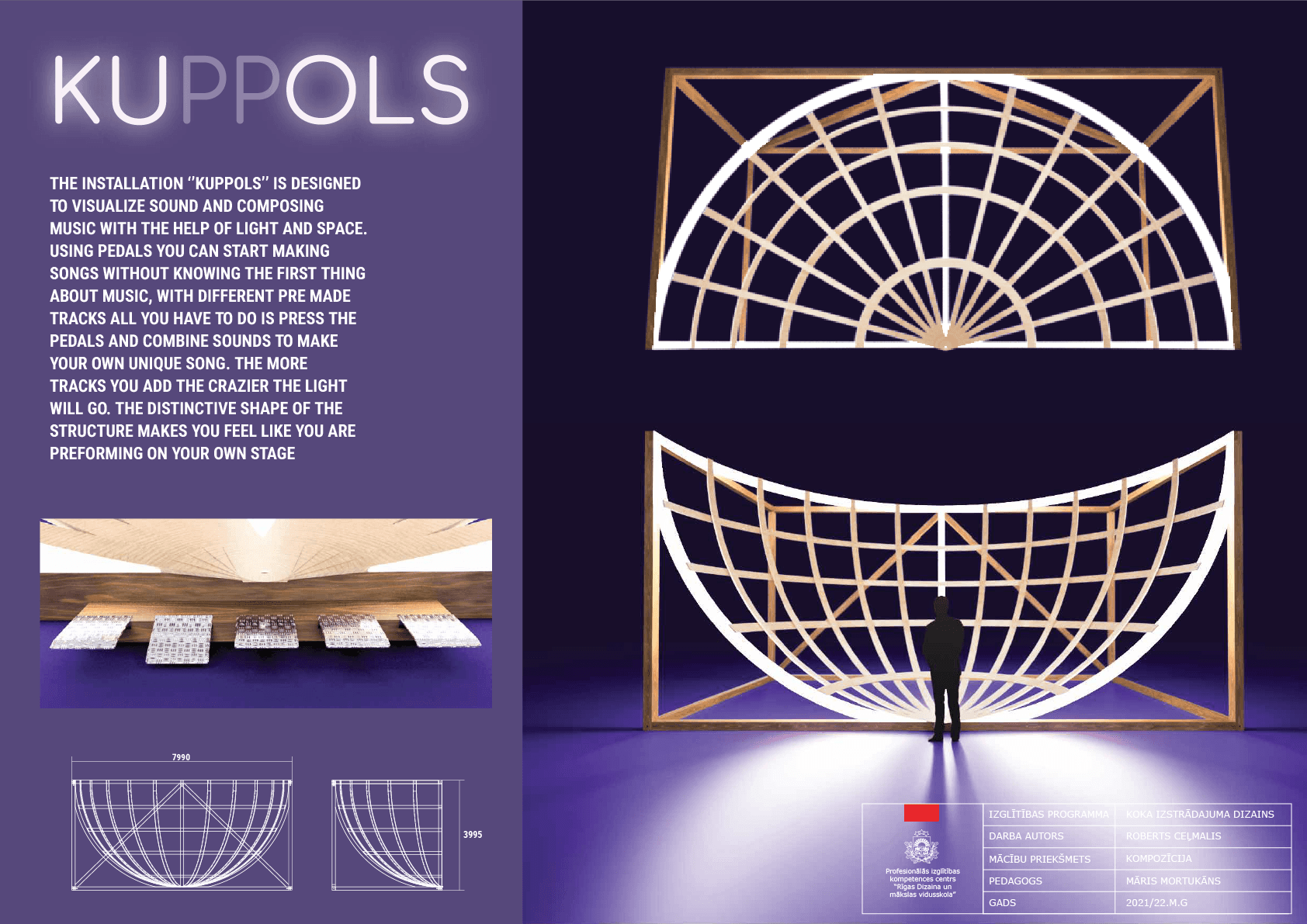
This installation concept was originally conceived for presentation at Riga's annual 'Staro Rīga' light festival, where it was designed to be a highly accessible and intuitive music mixer that demystifies sound creation for users without musical experience. By abstracting away the complexities of music theory and production software, the interface allows anyone to immediately capture the feeling of composing a unique track through simple, tactile interaction—selecting musical patterns and controlling individual stems.
The goal is to lower the creative barrier to entry, providing the immediate satisfaction of self-expression that can serve as a powerful catalyst for users to explore deeper journeys into music making as a tool for personal reflection and creative empowerment.
This installation concept was originally conceived for presentation at Riga's annual 'Staro Rīga' light festival, where it was designed to be a highly accessible and intuitive music mixer that demystifies sound creation for users without musical experience. By abstracting away the complexities of music theory and production software, the interface allows anyone to immediately capture the feeling of composing a unique track through simple, tactile interaction—selecting musical patterns and controlling individual stems.
The goal is to lower the creative barrier to entry, providing the immediate satisfaction of self-expression that can serve as a powerful catalyst for users to explore deeper journeys into music making as a tool for personal reflection and creative empowerment.